Process Dump is a Windows reverse-engineering tool to dump malware memory components back to disk for analysis. It uses an aggressive import reconstruction approach to make analysis easier, and supports 32 and 64 bit modules. Dumping of regions without PE headers is supported and in these cases PE headers and import tables will automatically be generated. Process Dump supports creation and use of a clean-hash database, so that dumping of clean files such as kernel32.dll can be skipped.
Process Dump 3.0.0 was released on October 2nd, 2026. The ZIP includes both Windows builds; no Visual C++ Redistributable is required.
- Download: Process Dump 3.0.0 for Windows 32 and 64 bit
- GitHub release and individual binaries
Process Dump: Dump memory modules to disk
Source Code
The source code and full command-line documentation are available through GitHub. Contributions are welcome:
- https://github.com/glmcdona/Process-Dump
- https://github.com/glmcdona/Process-Dump
Example Usage
Use pd64.exe on 64-bit Windows (recommended), or pd32.exe on 32-bit Windows.
Dump all accessible processes, skipping known clean modules:
- pd64.exe -system
Dump all modules from a specific process identifier:
- pd64.exe -pid 0x18A
Dump all modules by process name:
- pd64.exe -p ".*chrome.*"
Build a baseline on a clean system before dumping. Run these as separate commands:
- pd64.exe -db genquick (running processes only)
- pd64.exe -db gen (also scans common folders)
Monitor hooked processes and dump before they close. Use in a controlled environment; Ctrl+C stops the monitor:
- pd64.exe -closemon
Dump code from a specific address in PID 0x1a3:
- pd64.exe -pid 0x1a3 -a 0x401000
If no PE header exists, both 32-bit and 64-bit headers are generated for analysis.
Dump with four workers into an existing output folder:
- pd64.exe -system -t 4 -o C:\dumps
Existing files are not overwritten. Dumps are for analysis and are not guaranteed to run.
Dump all accessible processes, skipping known clean modules:
- pd64.exe -system
Dump all modules from a specific process identifier:
- pd64.exe -pid 0x18A
Dump all modules by process name:
- pd64.exe -p ".*chrome.*"
Build a baseline on a clean system before dumping. Run these as separate commands:
- pd64.exe -db genquick (running processes only)
- pd64.exe -db gen (also scans common folders)
Monitor hooked processes and dump before they close. Use in a controlled environment; Ctrl+C stops the monitor:
- pd64.exe -closemon
Dump code from a specific address in PID 0x1a3:
- pd64.exe -pid 0x1a3 -a 0x401000
If no PE header exists, both 32-bit and 64-bit headers are generated for analysis.
Dump with four workers into an existing output folder:
- pd64.exe -system -t 4 -o C:\dumps
Existing files are not overwritten. Dumps are for analysis and are not guaranteed to run.
Screenshots
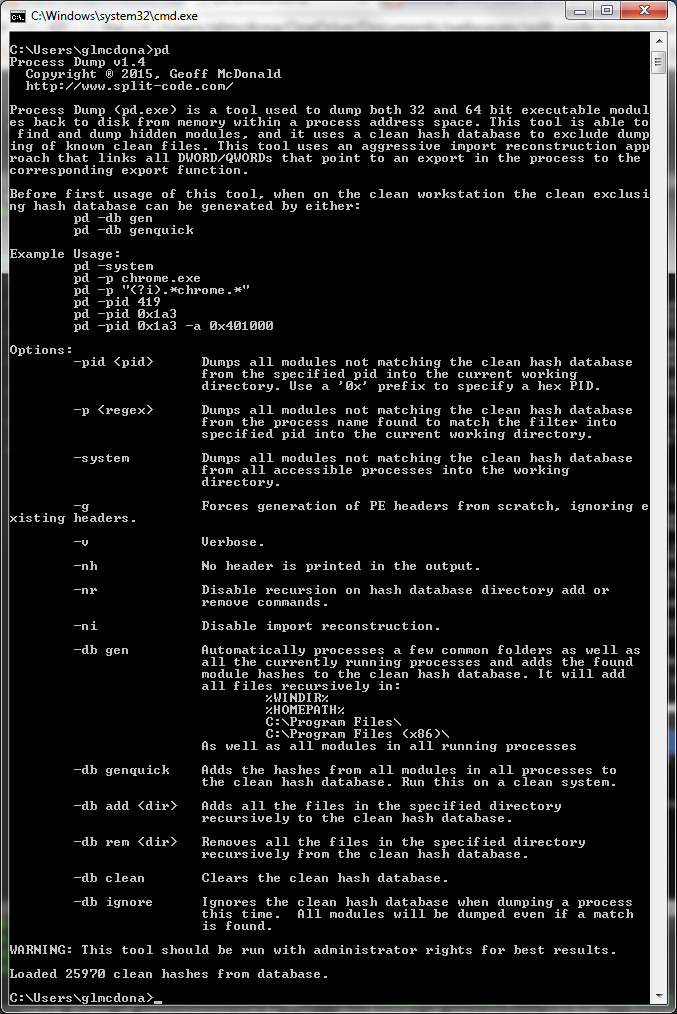
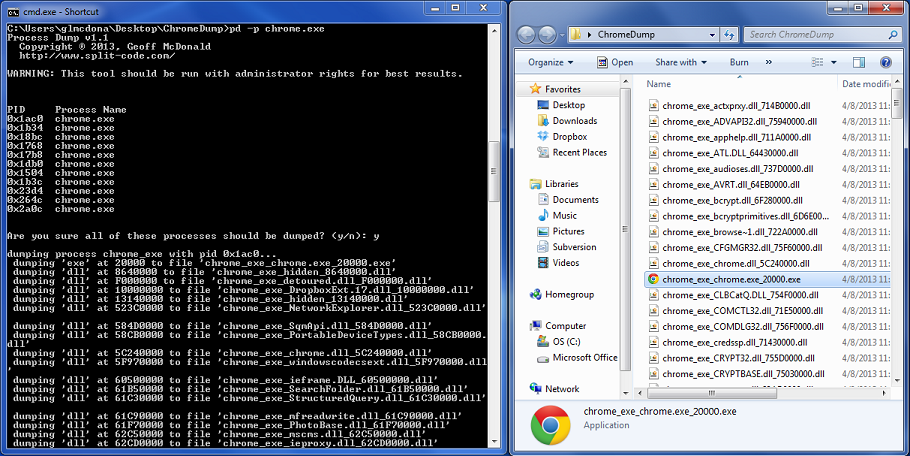
Command-line Options
Run pd64.exe --help for full help.
- Full command-line documentation
Dump commands:
  -system            Dump unknown modules and loose code system-wide.
  -pid <pid>         Dump one process; decimal or 0x-prefixed hex.
  -p <regex>         Match a complete process name (case-sensitive).
  -closemon          Dump hooked processes before exit.
  -a <address>       Dump at a base address; requires -pid.
  -o <path>          Output folder (default: working directory).

Database commands (run separately from dumping):
  -db gen            Add live hashes and PE files from common folders.
  -db genquick       Add live hashes only.
  -db add <dir>      Add PE file hashes recursively.
  -db remove <dir>   Remove clean-module hashes (alias: -db rem).
  -db clean          Clear all three databases.
  -db ignore         Ignore all loaded databases for this dump run.
  -nr                Do not recurse for database add/remove.
  -cdb <file>        Clean hash database path (alias: -c).
  -edb <file>        Entry-point hash database path.
  -esdb <file>       Short entry-point hash database path.

Advanced options:
  -g                 Generate both x86 and x64 headers.
  -ni                Disable aggressive import reconstruction.
  -nc                Disable loose-code dumping and hashing.
  -nep               Disable recovery and live entry-point hashing.
  -eprec             Force entry-point recovery; -nep overrides it.
  -reexec            Experimental re-run preparation; discards state.
                     Does not execute the dump or guarantee it runs.
  -t <count>         Worker count for system/DB/monitor work (default 16).
  -nt                Use one worker; last -t/-nt wins.
  -v                 Verbose output.
  -nh                Suppress the version/copyright banner.
  --help             Print help and exit (aliases: -help, -h, --h).
Database files default to the application directory: clean.hashes, entrypoints.hashes and shortentrypoints.hashes.- Full command-line documentation
Version History
Version 3.0.0 (October 2nd, 2026)
- Fixed oversized and empty dumps, and improved section and import reconstruction.
- Improved entrypoint recovery.
- Sped up system dumping and database generation.
- Fixed security and reliability issues, and added automated tests.
Version 2.1.1 (January 24, 2022)
- Statically link libraries, which removes the pre-install dependency on Microsoft Visual C++ Redistributable per suggestion from Blaine for easier integration to Mandiant FLARE-VM (https://github.com/mandiant/flare-vm).
Version 2.1 (February 12th, 2017)
- Fixed a bug where the last section in some cases would instead be filled with zeros. Thanks to megastupidmonkey for reporting this issue.
- Fixed a bug where 64-bit base addresses would be truncated to a 32-bit address. It now properly keeps the full 64-bit module base address. Thanks to megastupidmonkey for reporting this issue.
- Addressed an issue where the processes dump close monitor would crash csrss.exe.
- Stopped Process Dump from hooking it's own process in close monitor mode.
Version 2.0 (September 18th, 2016)
- Added new flag '-closemon' which runs Process Dump in a monitoring mode. It will pause and dump any process just as it closes. This is designed to work well with malware analysis sandboxes, to be sure to dump malware from memory before the malicious process closes.
- Upgraded Process Dump to be multi-threaded. Commands that dump or get hashes from multiple processes will run separate threads per operation. Default number of threads is 16, which speeds up the general Process Dump dumping processing significantly.
- Upgraded Process Dump to dump unattached code chunks found in memory. These are identified as executable regions in memory which are not attached to a module and do not have a PE header. It also requires that the codechunk refer to at least 2 imports to be considered valid in order to reduce noise. When dumped, a PE header is recreated along with an import table. Code chunks are fully supported by the clean hash database.
- Added flags to control the filepath to the clean hash database as well as the output folder for dumped files.
- Fix to generating clean hash database from user path that was causing a crash.
- Fix to the flag '-g' that forces generation of PE headers. Before even if this flag was set, system dumps (-system), would ignore this flag when dumping a process.
- Various performance improvements.
- Upgraded project to VS2015.
Version 1.5 (November 21, 2015)
- Fixed bug where very large memory regions would cause Process Dump to hang.
- Fixed bug where some modules at high addresses would not be found under 64-bit Windows.
- More debug information now outputted under Verbose mode.
Version 1.4 (April 18, 2015)
- Added new aggressive import reconstruction approach. Now patches up all DWORDs and QWORDs in the module to the corresponding export match.
- Added '-a (address to dump)' flag to dump a specific address. It will generate PE headers and build an import table for the address.
- Added '-ni' flag to skip new import reconstruction algorithm.
- Added '-g' flag to force generation of new PE header even if there exists one when dumping a module. This is good if the PE header is malformed for example.
- Various bug fixes.
Version 1.3 (October 10, 2013)
- Improved handling of PE headers with sections that specify invalid virtual sizes and addresses.
- Better module dumping methodology for dumping virtual sections down to disk sections.
Version 1.1 (April 8, 2013)
- Fixed a compatibility issue with Windows XP.
- Corrected bug where process dump would print it is dumping a module but not actually dump it.
- Implemented the '-pid <pid>' dump flag.
Version 1.0 (April 2, 2013)
- Initial release.
- Fixed oversized and empty dumps, and improved section and import reconstruction.
- Improved entrypoint recovery.
- Sped up system dumping and database generation.
- Fixed security and reliability issues, and added automated tests.
Version 2.1.1 (January 24, 2022)
- Statically link libraries, which removes the pre-install dependency on Microsoft Visual C++ Redistributable per suggestion from Blaine for easier integration to Mandiant FLARE-VM (https://github.com/mandiant/flare-vm).
Version 2.1 (February 12th, 2017)
- Fixed a bug where the last section in some cases would instead be filled with zeros. Thanks to megastupidmonkey for reporting this issue.
- Fixed a bug where 64-bit base addresses would be truncated to a 32-bit address. It now properly keeps the full 64-bit module base address. Thanks to megastupidmonkey for reporting this issue.
- Addressed an issue where the processes dump close monitor would crash csrss.exe.
- Stopped Process Dump from hooking it's own process in close monitor mode.
Version 2.0 (September 18th, 2016)
- Added new flag '-closemon' which runs Process Dump in a monitoring mode. It will pause and dump any process just as it closes. This is designed to work well with malware analysis sandboxes, to be sure to dump malware from memory before the malicious process closes.
- Upgraded Process Dump to be multi-threaded. Commands that dump or get hashes from multiple processes will run separate threads per operation. Default number of threads is 16, which speeds up the general Process Dump dumping processing significantly.
- Upgraded Process Dump to dump unattached code chunks found in memory. These are identified as executable regions in memory which are not attached to a module and do not have a PE header. It also requires that the codechunk refer to at least 2 imports to be considered valid in order to reduce noise. When dumped, a PE header is recreated along with an import table. Code chunks are fully supported by the clean hash database.
- Added flags to control the filepath to the clean hash database as well as the output folder for dumped files.
- Fix to generating clean hash database from user path that was causing a crash.
- Fix to the flag '-g' that forces generation of PE headers. Before even if this flag was set, system dumps (-system), would ignore this flag when dumping a process.
- Various performance improvements.
- Upgraded project to VS2015.
Version 1.5 (November 21, 2015)
- Fixed bug where very large memory regions would cause Process Dump to hang.
- Fixed bug where some modules at high addresses would not be found under 64-bit Windows.
- More debug information now outputted under Verbose mode.
Version 1.4 (April 18, 2015)
- Added new aggressive import reconstruction approach. Now patches up all DWORDs and QWORDs in the module to the corresponding export match.
- Added '-a (address to dump)' flag to dump a specific address. It will generate PE headers and build an import table for the address.
- Added '-ni' flag to skip new import reconstruction algorithm.
- Added '-g' flag to force generation of new PE header even if there exists one when dumping a module. This is good if the PE header is malformed for example.
- Various bug fixes.
Version 1.3 (October 10, 2013)
- Improved handling of PE headers with sections that specify invalid virtual sizes and addresses.
- Better module dumping methodology for dumping virtual sections down to disk sections.
Version 1.1 (April 8, 2013)
- Fixed a compatibility issue with Windows XP.
- Corrected bug where process dump would print it is dumping a module but not actually dump it.
- Implemented the '-pid <pid>' dump flag.
Version 1.0 (April 2, 2013)
- Initial release.